◈TaskGenius Platform
Your business, modeled as one living system.
See demand, customers, jobs, revenue, reputation and attention in one connected operating picture — then zoom into the evidence behind every number.
Company→Flow→Evidence
- Sources connected
- Freshness visible
- Actions governed
The whole operating picture: demand through collected revenue, with source freshness attached.
- 68%
- 85%
- 85%
Booking flow
274 booked opportunities
- Source records connected
- Customer identities reconciled
- Unconfirmed appointments stay visible, not assumed
Bookings reconcile to their source records, so an unconfirmed appointment is visible rather than assumed.
- AttentionMissed follow-upEvidence attached
- Next moveReview callbackHuman review required
- OutcomeResult recordedWritten back to the evidence
Actions run only inside the permissions and operating boundaries you configure. This example requires human review.
Reputation 4.2 average — Feeds the next cycle of demand
Illustrative example — not a live readingAll sources current
See the whole business. Open the evidence.
- 01CompanySee the operating pictureDemand, customers, jobs, money and reputation connected in one view, with the freshness of each source attached to it.
- 02FlowFind where work slowsIsolate a lifecycle stage and see the conversion between steps, so a drop has a location instead of being a feeling.
- 03EvidenceUnderstand whyEvery number, attention item and proposed next move opens onto the records it came from.
Inside TaskGenius Platform
One connected workspace for what needs attention now.
The operating picture, the lifecycle from demand through collection, and the attention queue — in one view, from the product itself.
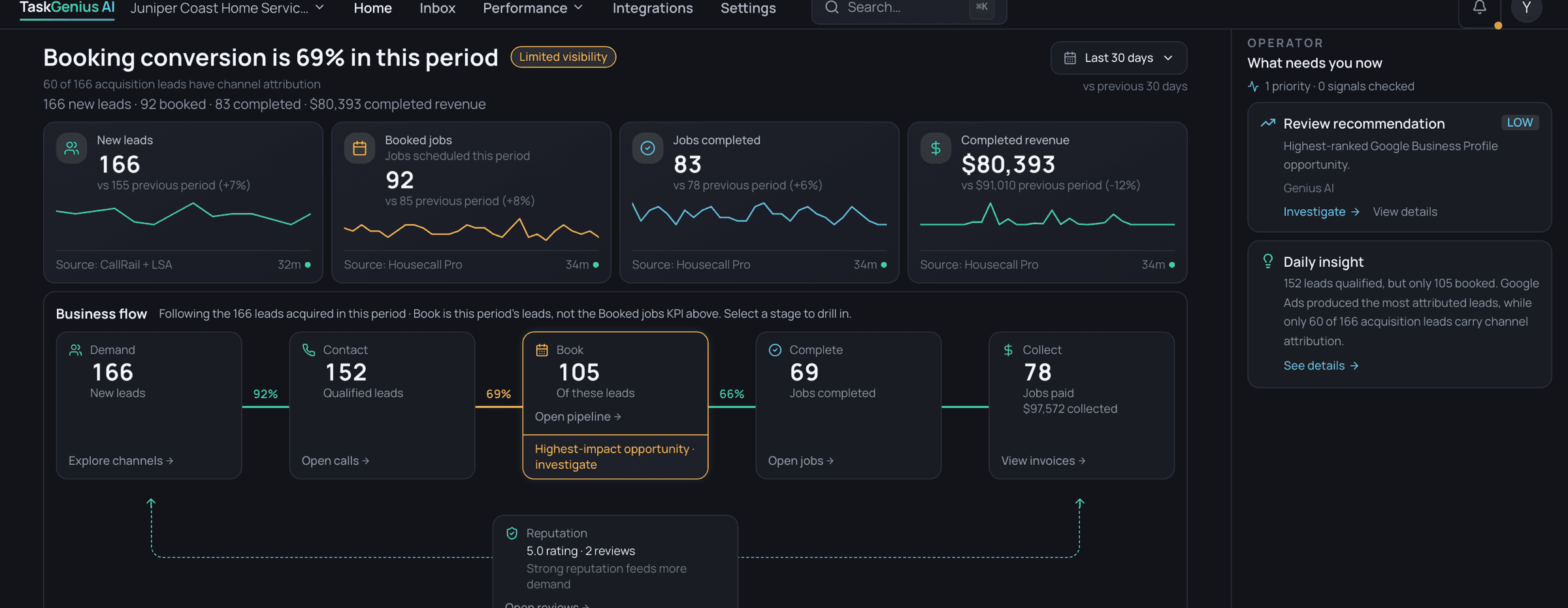
One operating picture, from demand to collected revenue.
Every stage of a customer — the signal that created them, the job it became, the money it collected and the next move it deserves — stays connected in one operating view.
Signal, Customer, Job and Money are recorded business evidence. Attention and Next move are derived from them. Outcome records what actually happened.
- SignalRecorded
- CustomerRecorded
- JobRecorded
- MoneyRecorded
- AttentionDerived
- Next moveDerived
- OutcomeRecorded
Attention you can inspect. Recommendations you control.
What needs attention, with the evidence behind it — and a proposed next move that waits for a person.
Condition detectedThe platform finds an unresolved condition in the booking flow: the job exists, but no record confirms the appointment was agreed with the customer.
Illustrative sequence, drawn from a booking condition the demo workspace surfaces. Actions run only inside the permissions and operating boundaries you configure. This example requires human review.
Know what the platform knows — and what it doesn’t.
Source state travels with the number. When a source is stale or has never synced, the platform says so instead of reporting a confident zero — which is why the demo workspace reads Unavailable for collected revenue rather than $0.
- CurrentSynced inside the expected window.
- StaleLast update is outside the expected window.
- DisconnectedNo current source connection.
- UnavailableReported as unavailable rather than as a confident zero.
Built around the operating shape of a home-service business.
The packaged product assumes the shape this kind of operation actually has: demand arrives by phone and form, becomes a job, becomes an invoice, and leaves a reputation behind it.
- Demand and conversationsCustomer demand · Calls and conversations · Advertising and attribution · Website and analytics
- Customers and jobsCRM and field-service records · Jobs and estimates
- Invoices and paymentsInvoices and payments
- Reputation and future demandReviews and reputation
Reputation feeds the next cycle of demand, which is why it closes the loop rather than ending it.
Connector availability is confirmed during discovery for your specific systems.
How a workspace comes online.
- 01ConnectMap the systems already in use.A source list with what each one can reliably provide.
- 02ReconcileResolve identity, lifecycle and money.One customer reads as one customer across systems.
- 03ConfigureSet attention rules and boundaries.Evidence requirements and the limits actions run inside.
- 04OperateWork from the connected picture.Attention, next moves and source trust in daily use.
Need the Platform or a custom system?
If your operation fits the connected home-service model, start with TaskGenius Platform. If the problem is specific to a specialized workflow, industry or system boundary, discuss a Custom AI System.